An AI workspace can expose more than a shared folder when an AI data platform connects sources, outputs, and integrations. One loose sharing setting can reveal source files or conversation history. Generative AI models may also expose source material through generated answers or study notes.
Clear workspace permissions let a group research, review, and create together. They support team collaboration without giving every member control of every document. The goal is simple: each person gets the access needed for their work, no more, reducing security risks.
Start by deciding what people can do, then match those abilities to the right role. The dispatch layer is the request-routing point that applies permissions before a model or connected source is reached.
Key Takeaways
Design permissions around task-based roles and least privilege, not job titles or organizational status.
Separate sensitive workspaces, documents, conversations, generated content, sharing, and exporting into appropriate permission boundaries.
Use conservative defaults, approved groups, SSO, MFA, and timely offboarding to control human access.
Give every AI agent a separate identity, narrower tool permissions, and approval requirements for high-impact actions.
Review membership, audit logs, retention settings, and connected integrations regularly to catch access drift.
Map permissions before inviting anyone
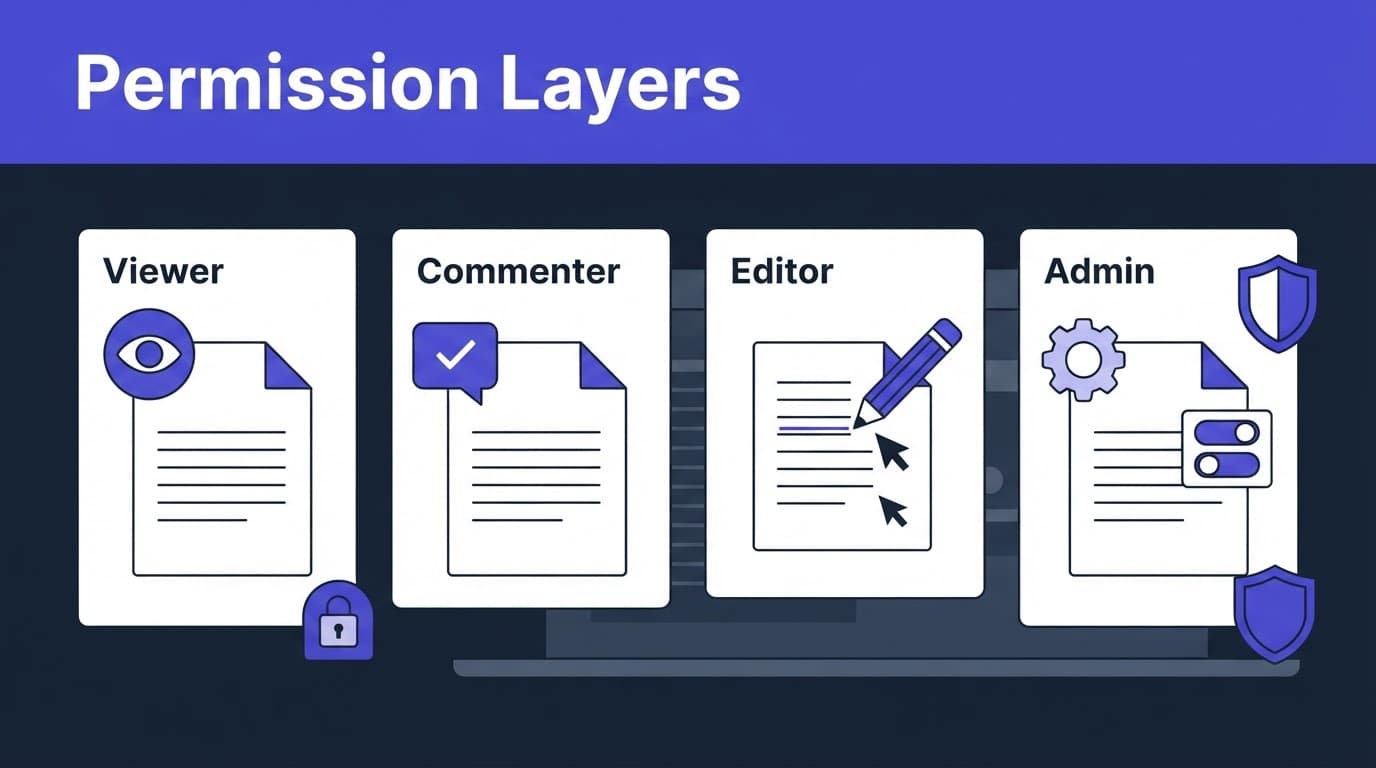
An access control model for an AI data platform should describe actions, not status. A professor, project lead, or department head doesn't automatically need administrative control. Likewise, a student or contractor may need to comment on a document without being able to download it.
Treat roles as bundles, not job titles
Role-based access control (RBAC) groups several allowed actions into a reusable role. It reduces access sprawl because administrators assign tested workspace roles to groups instead of building a one-off permission set for every person. A complete permission model may combine role rules with hierarchical permissions, where access inherits across workspace, library, folder, and document levels.
Capability | It lets a person do | It should not automatically let them do |
|---|---|---|
View | Read permitted documents, answers, and source citations | Change files, invite people, or download content |
Comment | Add notes, questions, or suggested corrections | Alter the original document or workspace membership |
Edit | Upload, rename, organize, and revise approved materials | Change retention rules, roles, or security settings |
Share | Invite approved collaborators and set their access level | Make public links or invite outside domains by default |
Export | Download approved source files or generated outputs | Export sensitive collections without an explicit policy |
Admin or owner | Manage members, settings, audit access, and workspace policy | Receive unrestricted access to every separate workspace |
A workspace owner often controls the workspace's life cycle, including transfers or deletion. Workspace admins usually manage broader duties, including identity, security policies, user management, and workspace settings. Standard users work inside the limits of their assigned role. The dispatch layer should enforce these rules before routing requests to data or generative AI models.
Many tools split management actions from data access. Azure's RBAC role documentation offers a useful example of this distinction between administrative actions and data actions.
Build roles around least privilege
Least privilege means granting the smallest practical level of access for a task. It applies across an AI data platform, including temporary collaborators, full-time staff, administrators, and automated tools.
Assign groups before assigning individuals
Create user groups around stable work patterns, such as "research assistants," "course reviewers," or "client project editors." Attach roles to them, so stable membership simplifies joiner and leaver changes without hunting through individual documents.
A research assistant who only annotates a literature collection needs comment access, not a workspace owner role. The same rule gives generative AI models only task-required access. Similarly, a team lead may edit project materials while another administrator handles billing, identity, and retention settings.
Centralize identity controls with single sign-on (SSO) and multi-factor authentication (MFA) when the platform supports them. SCIM enables automated provisioning for account creation and removal, but it doesn't determine authorization, which still depends on your role design.
Put sensitive work behind separate boundaries
Keep restricted collections separate from everyday workspaces, treating each as a separate workspace boundary. A workspace containing student records, legal files, clinical notes, unpublished research, or customer data needs tighter membership and sharing rules in its workspace settings than a general brainstorming area.
Don't rely on a broad organization-wide role to protect sensitive material; it enlarges the blast radius. For regulated or sensitive material, evaluate vendor assurances and compliance certifications. Limit access at the workspace, library, folder, document, and connector levels where available. Also restrict external invitations and public links unless a workspace has an approved reason to use them.
Set AI workspace permissions in seven deliberate steps
A consistent setup process prevents small exceptions from becoming permanent security problems. This seven-step process helps you inventory and protect an AI data platform.
Inventory the material first. Identify the AI data platform and its connected assets. List uploaded files, generated reports, quizzes, transcripts, conversation history, generative AI models, integrations, and exports. You can't protect assets you haven't identified.
Classify the workspace. Mark it as public, internal, confidential, or restricted according to your organization's policy. Higher-risk workspaces need fewer default members and tighter sharing controls.
Define task-based roles. Document the permission model around specific tasks. Decide which groups need viewing, commenting, editing, sharing, exporting, or administration access. Keep sharing and exporting separate from editing when the platform allows it.
Set the default role conservatively. Use workspace settings to give new members viewer or commenter access by default, unless their work calls for more access. Elevate access after a request, not before.
Control external access. Limit invitations to approved domains, require expiration dates for guests, and disable anonymous links for confidential work. Review whether guests can reshare material.
Connect identity controls to offboarding. Require SSO and MFA where available. Use SCIM or another account life-cycle process so former staff, students, and contractors lose access promptly.
Test each role with a real account. Confirm what a viewer, commenter, editor, and administrator can actually see and do. Verify how requests are routed and authorized through the dispatch layer. Record the result, because interface labels and role names differ across platforms.
Protect documents, conversations, and generated content
An AI data platform has more data paths than a conventional shared drive. A seemingly harmless role can expose information through a cited answer, conversation transcript, or export file.
Treat each AI artifact as its own data type
Uploaded documents are the source material. Generated summaries, flashcards, slide outlines, and answers are new copies that can repeat sensitive details. Platform-specific assets such as custom GPTs may also hold knowledge, prompts, or outputs that need separate controls. Conversation history can reveal excerpts, prompts, and questions that never appear in the original file.
Set rules for all three, plus any configured AI assets. For example, an editor might upload and organize course readings but lack export rights. A reviewer might read AI-generated feedback but not open the full source documents behind it. Apply your data classification policy to generated content as well as raw files.
Check retention and model-training settings
Retention isn't a single switch. An AI data platform can apply platform-wide policies differently from individual workspace rules. Audit logs, uploaded files, chat history, temporary conversations, generated outputs, and backups may each follow separate policies.
For example, the Google Workspace Privacy Hub states that administrators can set Gemini in Workspace prompt and response retention from 90 days to indefinite, while Gemini app conversation retention can run up to 36 months. These product-specific options show why administrators should inspect workspace settings for retention and sharing controls separately.
Confirm whether prompts, files, and generated outputs are used to train generative AI models under your plan and contract. Review retention, training, and contractual terms for enterprise data protection and data privacy. OpenAI's business data settings describe product-specific retention controls for qualifying organizations, but each platform's commitments and controls differ.
Vendor compliance certifications can support a review, but they can't replace checking actual data controls.
Give AI agents narrower tool permissions
An AI data platform may connect to a drive, database, ticketing system, or Model Context Protocol (MCP) server. Its agent still needs runtime authorization beyond a person's workspace access.
A person who can edit a document hasn't automatically authorized an agent to invoke generative AI models. That right also doesn't permit the agent to email the document, create a ticket, or transmit outputs to an external service.
Give each agent a separate identity
Create a dedicated identity for every agent or automation. Assign a named owner who reviews its purpose, approved tools, data scope, and removal process. Never run an agent with a shared administrator account. Don't use a broad API key that no one owns, because it expands the blast radius.
Microsoft's least-privilege guidance for AI agents recommends unique agent identities, task-based scopes, tool allowlists, and detailed logging. Apply the same principle to document retrieval. An agent should search only approved libraries and collections.
Require approval for high-impact actions
Use a dispatch layer to mediate requests between an agent and its connected tools. Set clear action states: disabled, ask for approval, or allowed automatically. Reading a pre-approved reference collection might run automatically. Exporting files, sending messages, changing records, or calling an external connector should require approval.
Removing a person from a workspace doesn't revoke a separate agent token or shared API key.
Treat each MCP server and connector as a separate permission boundary. Limit what the agent can read, what it can write, and where it can send data. Test revocation before relying on it in production workflows.
Use audit logs and access reviews to catch drift
Workspace settings evolve as membership shifts, projects end, guests linger, and an AI data platform adds integrations and connected resources. Access drift becomes harder to contain as the blast radius expands, so access reviews keep those changes visible.
Capture enough detail to reconstruct an event
A useful event record links the requesting user, agent identity, role, action, affected resource, time, result, and approval record. For sensitive actions, identify the generative AI models and the connector or tool involved. Record the dispatch layer that authorized the event and a correlation ID connecting related events.
Keep these records protected from routine workspace editors. Microsoft's Copilot data protection architecture describes audit records for prompts, responses, and referenced content, which is the level of visibility AI-enabled work often needs.
Review membership on a schedule
Review sensitive workspaces monthly. For lower-risk shared libraries, use quarterly reviews as an operational control for security governance. Confirm with workspace owners that every member, group, guest, service account, and agent still needs access to data and conversation history.
Revoke former users promptly. Remove them from groups, end active sessions, disable personal API keys, rotate shared credentials, and revoke access granted through linked tools. A deleted account can still leave behind active automation if you only remove its workspace role.
Permissions checklist before you share
Review the workspace settings once before opening an AI data platform workspace to a new group.
Every person belongs to an approved group with a task-based role.
Viewer, commenter, editor, sharing, exporting, and admin rights are set separately where possible.
Sensitive source materials sit in restricted workspaces with limited membership.
External invitations, public links, and resharing follow a written policy.
Guest access has an expiration date and a named sponsor.
SSO and MFA protect human accounts, and offboarding removes access quickly.
Retention rules cover documents, generated outputs, and conversation history.
Each agent has its own identity, limited tools, and an approval path for high-impact actions.
Audit logs record permission changes, document access, exports, and agent activity.
Check current platform documentation and compliance certifications before applying any role, but don't treat certifications as a substitute for configuration review. Labels, menus, data controls, and available security features can change.
Frequently Asked Questions
What are AI workspace permissions?
AI workspace permissions define what people, agents, and integrations can view, create, share, export, or administer. They apply not only to documents, but also to conversations, generated outputs, connected sources, and tools.
How should roles be designed for an AI workspace?
Build roles around specific tasks instead of job titles, and grant the smallest practical level of access. Keep viewing, commenting, editing, sharing, exporting, and administration separate where the platform allows it.
Should AI agents use the same permissions as workspace users?
No. Each agent should have a separate identity, a narrow data scope, and an allowlist of approved tools because a person's document access does not automatically authorize an agent to send, export, or modify information.
How often should workspace access be reviewed?
Review sensitive workspaces monthly and lower-risk shared libraries at least quarterly. Confirm that every user, guest, group, service account, and agent still needs access, and revoke unused access promptly.
What should be checked before sharing an AI workspace?
Confirm that members have approved task-based roles, sensitive material is separated, external sharing follows policy, and guest access has an expiration date. Also verify retention settings, audit logging, agent approvals, and offboarding controls.
Final thoughts
A well-governed AI data platform stays useful without turning into an open filing cabinet. Start with least privilege, separate high-risk actions such as sharing and exporting, and review access after the workspace goes live.
The strongest AI workspace permissions are clear enough for users to understand and strict enough to protect the material they depend on.